The reason for this whole article was a power outage on 02.02.2026. Obviously, it caused my Proxmox home server to go offline because it is not backed up by a UPS at all. But even after the power on the grid was restored, I wasn't able to reach anything in my network, neither locally nor externally. So I started to research and troubleshoot.
Troubleshooting & requirements
Quickly I found out that the DHCP and the DNS services were the reasons, which I both delegated to a Pi-Hole VM on the Proxmox Server. Most devices lost their default gateway, so I received a Network is Unreachable error, which initially made me think that my router was defect.
The reason why Pi-Hole did not come back online and caused DHCP to stop in my internal network, was most likely an empty CR2032 battery (I didn't notice that it went empty because it's not monitored, and I only reboot the server rarely), but it caused the UEFI boot mode to fail. So my headless server was stuck, and I needed to set it to boot via AHCI.
So all of this made me think about my setup, and I discovered these requirements, I wanted to achieve with the new solution:
- let the router do DHCP for my network again
- FOSS & privacy respecting solution
- block Ads/Trackers via DNS
- provide local DNS records for two separate home locations
- encrypted with DoT (DNS-over-TLS) or DoH (DNS-over-HTTPS)
Configure the FRITZ!Box
First I moved the DHCP functionality back to the Fritz!Box, because in situations like this it was quite stupid to rely on another machine for a basic functionality like DHCP, because it can lead to annoying problems like this time.
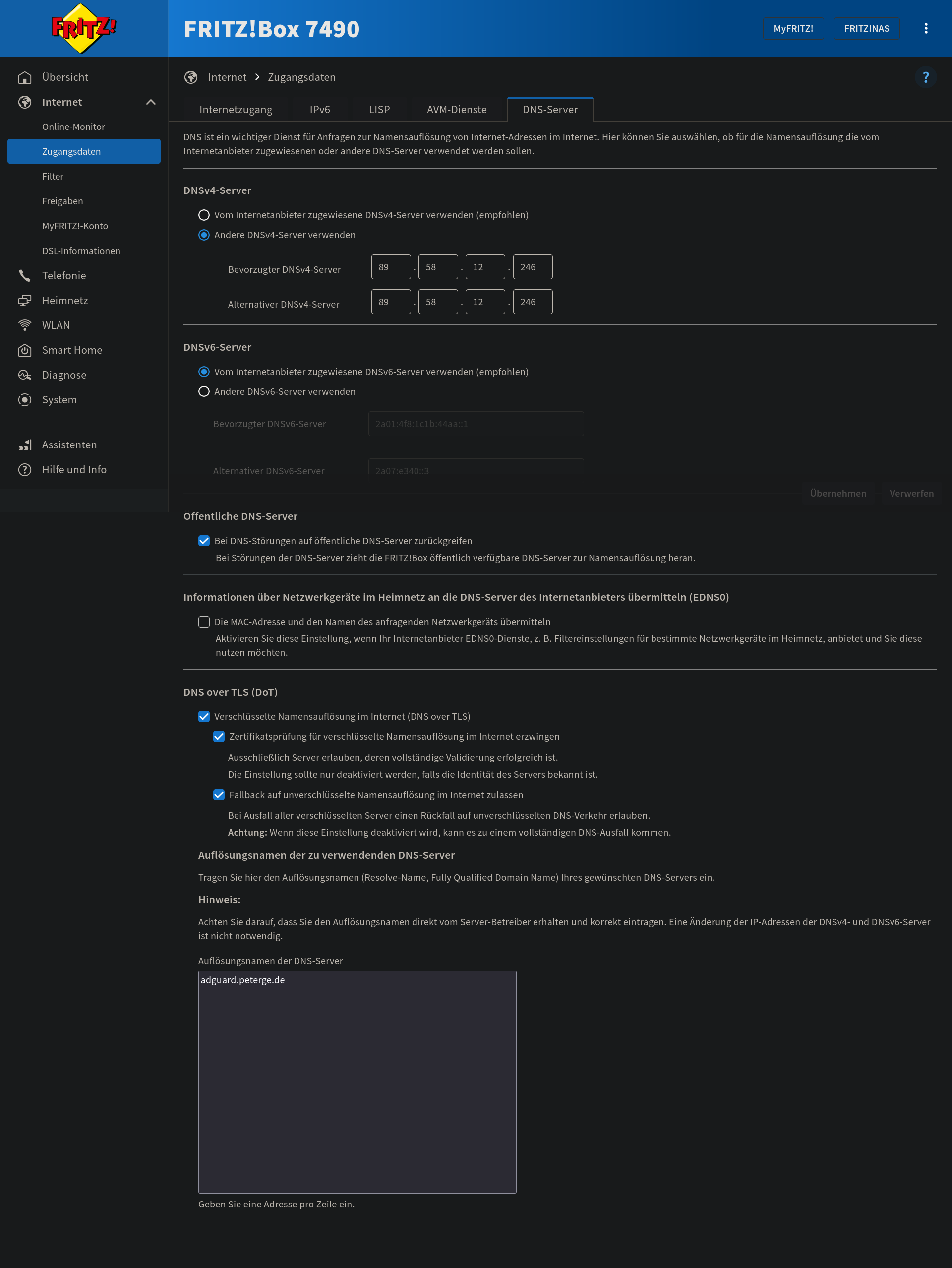
The next day I chatted with a friend of mine, and he told me that he is using DoT via his FRITZ!Box and is very happy with this solution. So we looked into the settings ("Internet > Zugangsdaten > DNS-Server") and the best and most fault forgiving but secure by default setup are these options combined:
AdGuard Home
But this was not enough for me, I wanted more control over my DNS entries to be able to resolve them from two locations independently.
And this was where I found this video and started to look into AdGuard Home:
The benefits of AdGuard Home compared to Pi-Hole can be found here, most importantly for me were encrypted DNS upstream servers without additional Software and that it runs as a DNS-over-HTTPS or DNS-over-TLS server.
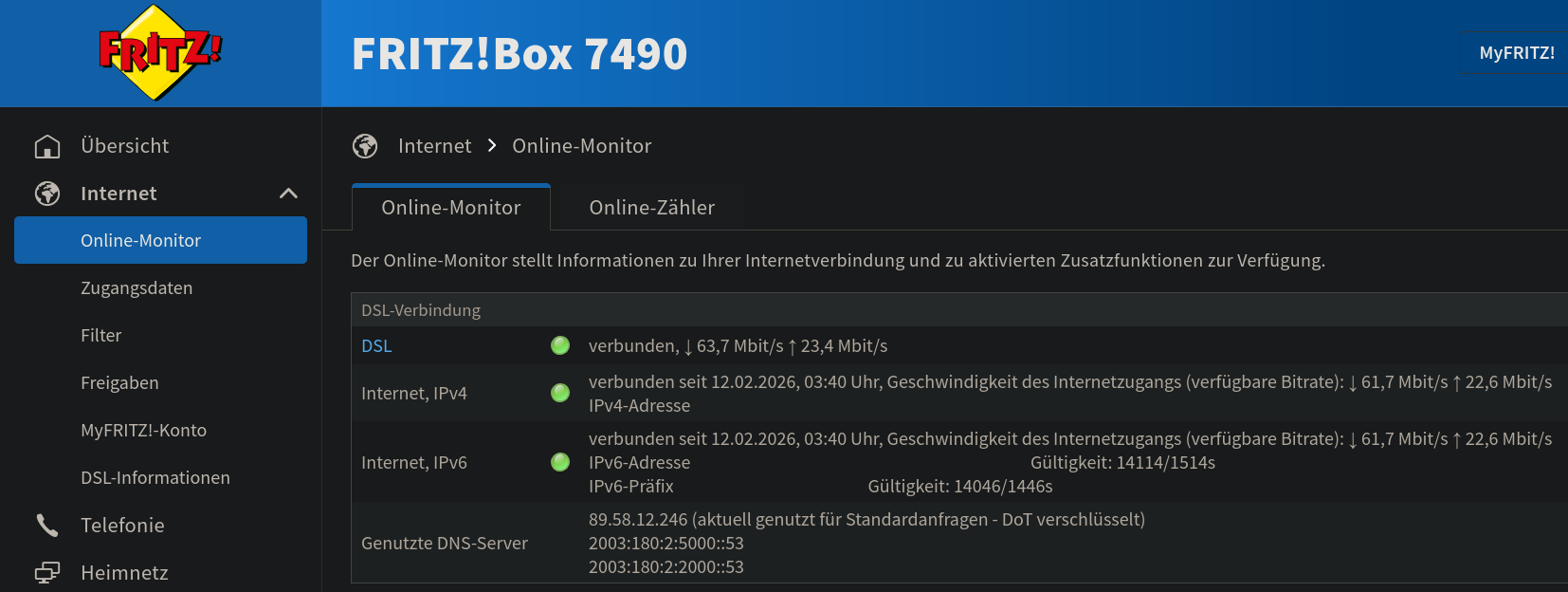
So I set up a publicly reachable instance of AdGuard Home, and after spending some time with ports and certificates I was done and started using it in my FRITZ!Box:
Another great side effect in this topic was that I discovered that meanwhile (I do not follow up with the AVM software releases) the 7490 does support WireGuard VPN, so I was able to stop using wg-easy, which I set up long time ago because of the 7490 was not the first router to get WireGuard VPN by AVM due to its age.
Config & Statistics
So here is my compose config for AdGuard Home:
  adguard:
    image: adguard/adguardhome
    container_name: adguard
    environment:
      - TZ=Europe/Berlin
    ports:
      - "127.0.0.1:8124:8124/tcp" # Bind to localhost so Nginx can reach it
      - "853:853/tcp"             # Keep for DoT (direct)
      - "853:853/udp"             # DoT also uses UDP occasionally
      - "784:784/udp"             # Keep for DoQ (direct)
    volumes:
      - /srv/docker/adguard/work:/opt/adguardhome/work
      - /srv/docker/adguard/conf:/opt/adguardhome/conf
      - /etc/letsencrypt:/opt/etc-letsencrypt:ro
    restart: unless-stopped
The certificates are generated via certbot, and I use Nginx as web server with those 2 locations:
    location / {
        proxy_pass http://127.0.0.1:8124;
        proxy_set_header Host $host;
        proxy_set_header X-Real-IP $remote_addr;
        proxy_set_header X-Forwarded-For $proxy_add_x_forwarded_for;
        proxy_set_header X-Forwarded-Proto $scheme;
    }

    # 2. Handle DNS-over-HTTPS (The part dig needs)
    location /dns-query {
        proxy_pass http://127.0.0.1:8124/dns-query;
        proxy_http_version 1.1;
        proxy_set_header Host $host;
        proxy_set_header X-Real-IP $remote_addr;
        proxy_set_header X-Forwarded-For $proxy_add_x_forwarded_for;
        proxy_set_header X-Forwarded-Proto $scheme;
        # DoH uses specific content types; ensure they aren't buffered/modified
        proxy_set_header Connection "";
        proxy_cache_bypass $http_upgrade;
    }
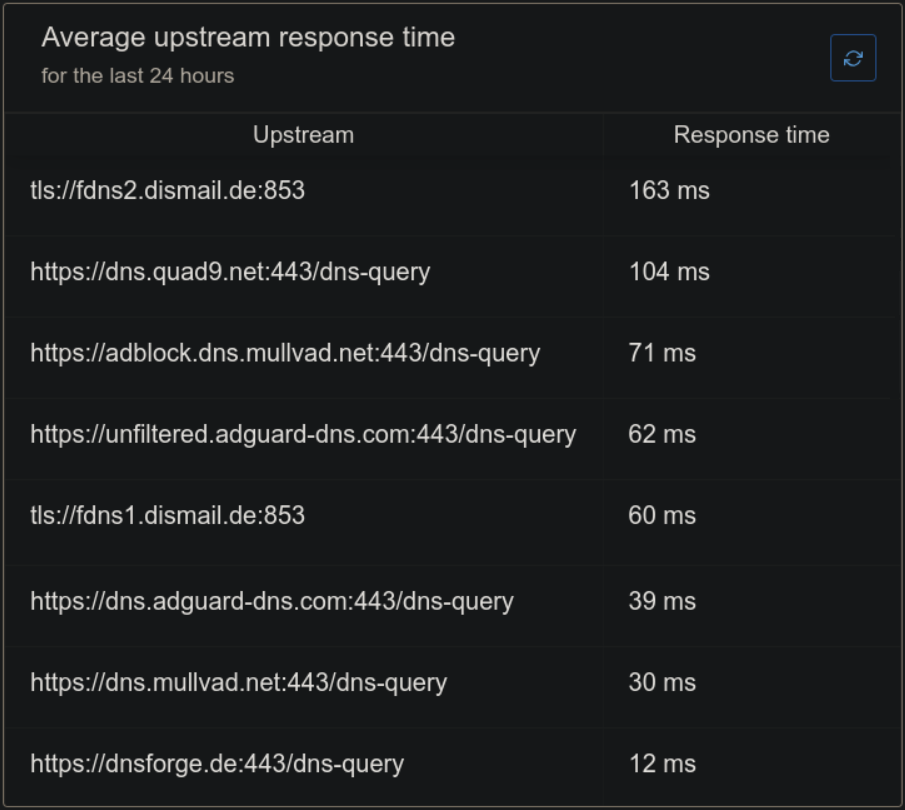
I have set up these upstreams, and the Dashboard shows their response times and load balances between them. AdGuard Home uses a weighted random algorithm to select servers with the lowest number of failed lookups and the lowest average lookup time:
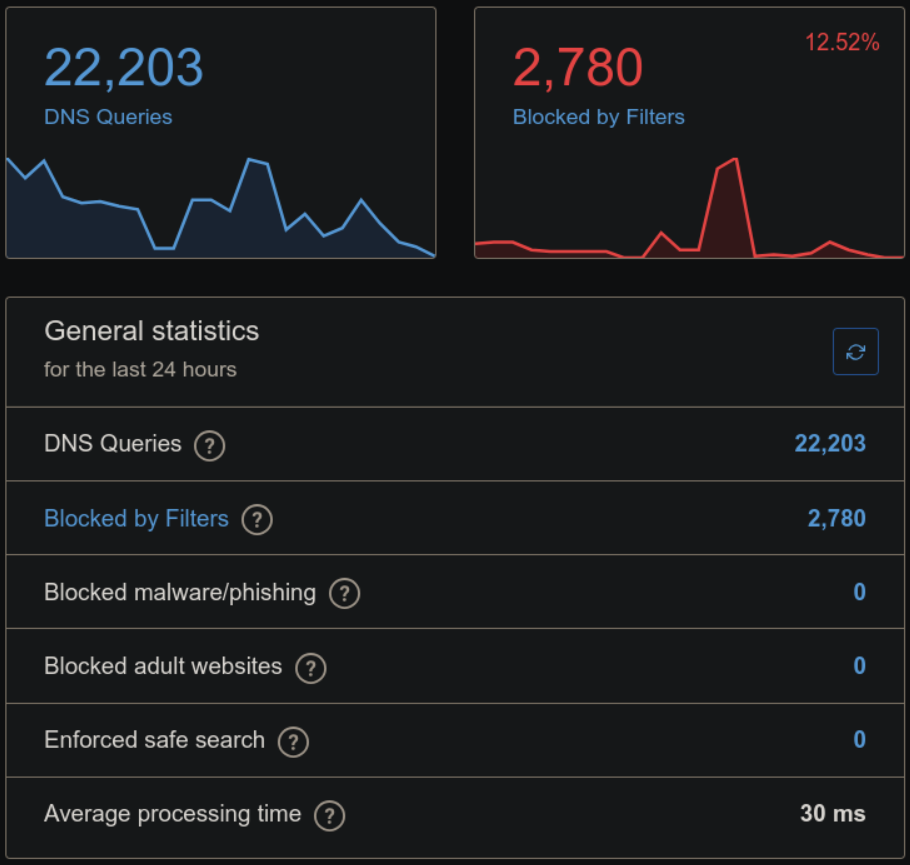
And this is what my statistic look like on the server in 24 hours:
Update Allowed clients automatically
But there is one last thing I wanted to solve. Because AdGuard only allows numbers, lowercase letters, and hyphens for the Client Identifiers, I am unable to enter the MyFRITZ! domain for our router to update its dynamic IP address regularly. Furthermore, I can't enter the MAC Address, because AdGuard does not know them when you are not using it as DHCP server (see this issue). And because this was one of my requirements (to move the DHCP server back to the router), I continued researching for another solution, but none of those mentioned met my requirements. For now, I use this script, to change the Allowed clients in the Access settings with my Public IPv4 via the API:
#!/bin/bash

# --- CONFIG / PATHS ---
AGH_URL="http://127.0.0.1:8124"
AGH_USER="admin"
AGH_PASS="vaFSa2cwLxT7a8zbukYP"
MYFRITZ_HOST="f2vl6j35r053edoi.myfritz.net"	# FRITZ!Box Harperscheid
STATIC_IPS='"172.18.0.1"'			# Docker Bridge Network
IP_FILE="/tmp/last_agh_ip.txt"

# 1. Get current IP from MyFRITZ
CURRENT_IP=$(dig +short $MYFRITZ_HOST | tail -n1)

# 2. Safety check: Exit if DNS fails to resolve
if [ -z "$CURRENT_IP" ]; then
    exit 1
fi

# 3. Read the last known IP
if [ -f "$IP_FILE" ]; then
    LAST_IP=$(cat "$IP_FILE")
else
    LAST_IP=""
fi

# 4. Update AdGuard only if the IP has changed
if [ "$CURRENT_IP" != "$LAST_IP" ]; then
    # Direct API call to the local AdGuard instance
    curl -s -u "$AGH_USER:$AGH_PASS" -X POST "$AGH_URL/control/access/set" \
        -H "Content-Type: application/json" \
        -d "{
            \"allowed_clients\": [$STATIC_IPS, \"$CURRENT_IP\"],
            \"disallowed_clients\": [],
            \"blocked_hosts\": []
        }"
    # Update the cache file
    echo "$CURRENT_IP" > "$IP_FILE"
    echo "Access list updated: $STATIC_IPS and $CURRENT_IP"
else
    # No changes needed
    echo "Did not update access list, IP did not change."
    exit 0
fi
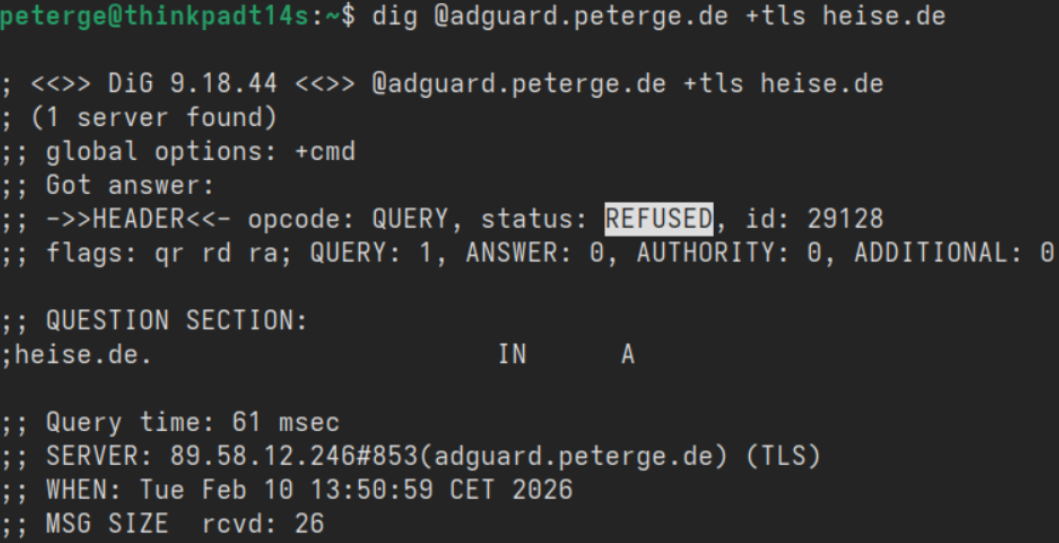
The script runs via Cron every minute and only changes the Allowed clients via the API when the IP is updated. This ensures that everyone else gets a REFUSED status on their DNS requests to my AdGuard Home instance: